

Post Menu and Details.
- What "sent but not delivered" actually means
- Why your Facebook message is sent but not delivered
- How to fix a message stuck on "Sent"
- Server-side issues (when it isn't your fault)
- Sent but not delivered vs blocked, restricted, or ignored
- What doesn't work
- FAQ
- Final thoughts
Words: 2610
Reading time: ~10 minutes
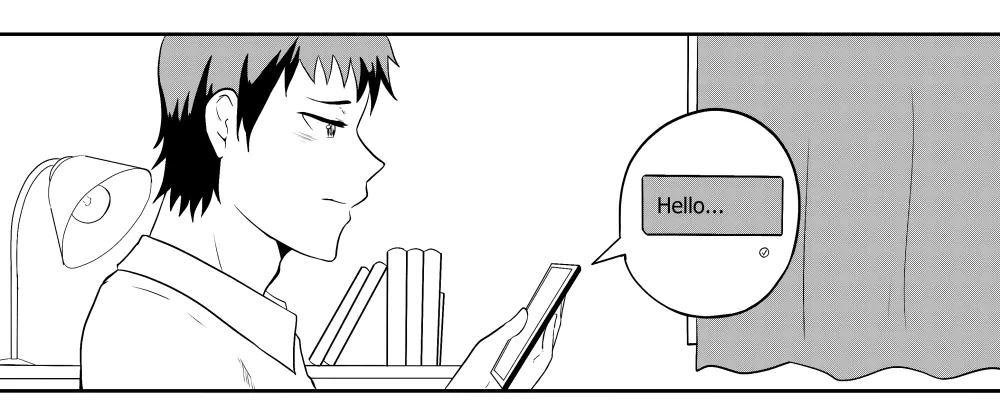
A Facebook message that shows “Sent” but never “Delivered” has left your phone and reached Facebook’s server, but it hasn’t arrived on the other person’s device yet. In plain terms: your side did its job, and the hold-up is on the receiving end. This guide explains what the status really means, the common reasons a message gets stuck on “Sent,” and the exact steps to fix it (plus how to tell a delivery glitch apart from being blocked or ignored).
What “sent but not delivered” actually means
Your message travels through three points: your phone, Facebook’s Messenger server, and the recipient’s phone. Sent confirms the first hop worked, so the message is sitting safely on Facebook’s server. Delivered only appears once it makes the second hop and lands on the recipient’s device. If it’s stuck on “Sent,” that second hop hasn’t happened, and the cause is almost always on their side, not yours. That’s the key takeaway: there’s usually nothing broken on your phone, so most “fixes” that involve wiping your own app are wasted effort.
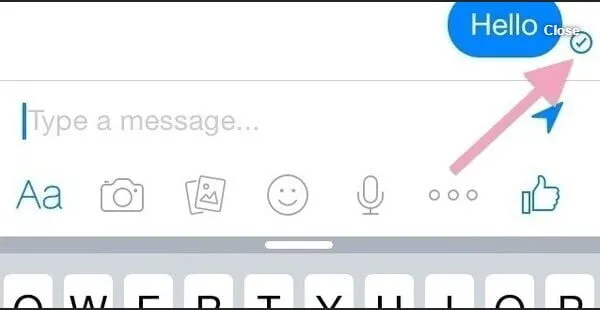
The status icons trip a lot of people up. Per Meta’s own key, an open blue circle with a check means sent, a filled-in blue circle with a check means delivered, and a small profile photo means seen. For the full icon-by-icon breakdown, see our guide to Messenger sent vs delivered vs seen.
Why your Facebook message is sent but not delivered
When Facebook messages aren’t delivering, one of these is usually why:
- The recipient is offline or off Messenger. They may be browsing Facebook in a web browser without the Messenger app running, so nothing is there to receive the message yet.
- You’re not their contact and the message is filtered. If you aren’t Facebook friends, your note lands in their Message Requests folder and shows as sent until they accept it.
- They’ve read it from the notification. A preview in the status bar can be read without opening Messenger, which never flips the status to delivered.
- They deliberately ignored the message. An ignored chat stays parked and won’t move past “Sent.”
- A temporary system glitch. Messenger has bad minutes like any app, and the status catches up once it clears.
- Their phone is off, dead, or has no signal. No connection on their end means no second hop.
- Your network is slow to sync. A weak connection on your side can delay the status update even after the message goes through.
- A Facebook or Messenger outage. When the platform itself is down, delivery stalls for everyone at once.
How to fix a message stuck on “Sent”
Work through these in order. The first few take seconds and rule out the easy causes before you assume the worst.
- Check for an outage first. Open Meta’s official Messenger status page or search “is Messenger down.” If an outage is reported, the problem isn’t you or the recipient, and messages will deliver once it’s fixed.
- Confirm your own connection. Switch between Wi-Fi and mobile data, load any other app or web page, and make sure you’re actually online. A dropped connection can leave a message hanging on “Sent.”
- Force-close and reopen Messenger. Fully close the app (or refresh the browser tab), reopen the thread, and let it resync. On a computer, logging out of Facebook and back in does the same thing. Also check that your Messenger app is updated, since an out-of-date version can hold messages in a pending state. This clears most short-lived glitches.
- Message a different friend. Send a quick note to someone else who’s active. If that one delivers, the stall is specific to the first person’s side, not your account. If nothing delivers to anyone, the issue is your app, network, or an outage.
- Give a server glitch time. If Messenger is having a bad spell, the message stays undelivered until the recipient’s server can pick it up. Leaving it alone for around an hour is often enough for a temporary hiccup to sort itself out.
- Try a voice or video call. If you’re sure the person is active and you just want the chat opened, a Messenger call is the fastest nudge. They either answer or dismiss it, and either way it wakes the conversation.
- Check whether you’re a saved contact. If you aren’t their Messenger contact or Facebook friend, your message may be sitting in their requests folder. Delivery only registers once they accept it, so there may be nothing to fix on your end.
If your message still won’t send at all (it won’t even reach “Sent,” or shows a red exclamation mark), that’s a different problem covered in Messenger not sending messages.
Server-side issues (when it isn’t your fault)
Messenger runs on its own servers, which are mapped by region. When you send a message, Facebook’s server tries to hand it to the recipient through the server assigned to their location. If that server is healthy, the message flips to delivered almost instantly. If it has a technical glitch, your message hangs, and your server reports back that there was no response from the recipient’s side yet.
This is why a message can sit on “Sent” even when the other person looks active. Active status is tied to Facebook, but message delivery runs through the Messenger server, so someone can be shown as online while their Messenger connection or regional server hasn’t picked up the message. The status only clears once their server is ready to accept the chat. If the outage is small, delivery usually catches up within a few hours; if it’s a bigger fault, it waits until the server is fixed.
Sent but not delivered vs blocked, restricted, or ignored
A stuck “Sent” does not automatically mean you’ve been blocked. Here’s how the four situations differ:
- Delivery glitch: temporary. The message delivers on its own once the recipient’s phone or server comes back. Other friends deliver normally.
- Ignored: the person moved your chat to their ignored folder. It can still show as delivered later; ignoring mutes notifications, it doesn’t bounce the message. More on ignored messages.
- Restricted: they used Messenger’s Restrict feature. Your messages go to their requests folder and they won’t get notifications, so replies can be slow or never come, but you can still see their profile.
- Blocked: if you’re fully blocked, you often can’t see their profile or start a new chat at all, and you’ll sometimes get “this person isn’t available right now.” If you suspect it and want to reconnect later, here’s how blocking and unblocking work.
The quick test: message two or three other active friends. If those deliver instantly and only one person’s stays on “Sent” for a long time, the issue is specific to that person (ignored, restricted, offline, or blocked), not a general glitch. Before assuming the worst, remember that a phone left off overnight or a person who rarely opens Messenger produces the exact same stuck “Sent,” so give it a day before you read anything into it.
What doesn’t work
Skip these, they waste time on a recipient-side problem:
- Spamming the same message. Sending it five more times won’t force delivery and can read as harassment. One message is on the server; that’s enough.
- Reinstalling Messenger to fix their stall. If the hold-up is the recipient’s phone or server, wiping and reinstalling your app does nothing. Only reinstall if your app is misbehaving across every chat.
- Assuming it’s your phone. When one chat sticks but the rest deliver, the fault isn’t your device or account, so factory resets and cache-clearing are overkill.
Related reading
- Messenger sent vs delivered vs seen — what every status icon means
- Messenger not sending messages — when a message won’t send at all
- What “ignore messages” means on Facebook
- How to unfriend someone on Facebook
FAQ
Does “sent but not delivered” mean I’m blocked?
Not on its own. It usually means the recipient is offline, off Messenger, or their server is glitching. If you’re blocked, you typically can’t see their profile or start a new chat at all. The reliable test is to message other active friends: if those deliver and only one stays on “Sent,” that person may have ignored, restricted, or blocked you, or is simply offline.
What does a single grey tick (open circle with a check) mean on Messenger?
In current Messenger that’s the “sent but not delivered” state: an open (unfilled) blue circle with a check. Your message reached Facebook’s server but hasn’t landed on the recipient’s device yet. Common reasons are a tech glitch, the receiver being offline, or being blocked.
What do the blue circle icons mean on Messenger?
Per Meta’s own key: an empty blue circle means the message is sending; an open blue circle with a checkmark means it’s been sent; a filled-in blue circle with a checkmark means it’s been delivered; and a small version of the recipient’s profile photo means they’ve seen it.
Do ignored messages still show as delivered?
They can. Ignoring a chat mutes notifications for the recipient, it doesn’t reject the message. If you’re already connected, an ignored message often still shows delivered. If you aren’t connected, it can stay in their requests folder and read as sent until they accept.
Why does it say sent but not delivered when they’re active?
Because “active” is a Facebook signal and delivery is a Messenger one. Someone can show as active on Facebook while their Messenger app is closed, logged out, or connected to a server that’s briefly glitching, so the message stays on “Sent” until that connection catches up. It can also mean they’ve moved your chat to requests and haven’t accepted it.
What’s the difference between sent and delivered on Messenger?
“Sent” means your message made it from your phone to Facebook’s Messenger server. “Delivered” means it made the next hop from that server to the recipient’s phone. Sent is step one; delivered is step two.
Why does Messenger only sometimes show “last active”?
Active status is optional. Anyone can turn off “Active Status” in their settings, which hides when they were last online. If the person has it off, you won’t see a last-active time even when they’re using the app.
How long should I wait for a message to deliver?
For a normal glitch or a brief outage, most messages deliver within minutes to a couple of hours once the recipient’s phone or server is back. If it’s still stuck after that and other friends receive your messages fine, the person is likely offline for longer, has ignored the chat, or has blocked you.
Can you tell if someone is online on Messenger?
Yes, if they’ve left Active Status on. Open the Messenger “Active” or people list and look for a green dot on their profile photo. A green dot means they’re online right now. No dot can mean they’re offline or that they’ve simply turned the setting off.
How do you know if someone is ignoring your messages?
A strong sign is seeing them show as active more than once while your message stays on “delivered” (not just “sent”) with no reply. That usually means they saw the notification and chose not to respond. On its own it isn’t proof, so weigh it with how they normally reply.
How can you tell if someone has turned off their Facebook or deactivated?
 Try opening their chat and sending a message. If their name still links to a normal profile and the message sends, the account is active. If their profile no longer opens, their photo disappears, or you get “this person isn’t available right now,” the account may be deactivated, restricted, or you’ve been blocked.
Final thoughts
A message stuck on “Sent” is rarely something you can force. Your side already did its part, so the fix is usually to rule out an outage, confirm your own connection, test a second friend, and then give a server glitch time to clear. If everyone else receives your messages and only one person’s stays undelivered for a long stretch, treat it as a sign about that specific chat rather than a fault with your account.
Thank you for reading!

Sir , I am Thomas Annamma. My fb friend Kuldip Singh is not getting my msg posted in the Messenger. The msg is marked with a white round n tick which means my msg is send. But he complains he is not receiving it n ask me to open new fb account . But i dont want to change my account as I have no problems with other contacts. Kindly rectify the defect .
Thank you
Most probably he blacklisted you by mistake. No need to create your account, he may change if he want
blacklisted ? How to do that ? I have the same problem as him and we both don’t know what to do. How to undo the blacklist ?
Good day Sir! I cannot send messages in my inbox but i can send in my messenger? What cause the problem?
Intersting question. Did you asked it in FB support?
I have been sending messages to all my friends & none of them delivered . Wondering what wrong with my messenger ? Can you fix it for me please . I’m not so technical . Thanks
Dear Sir.
I have a problem with FB messenger that my message is sent but not to be delivered to the other side and this is only happens to 1 contact because the rest is fine. He is not in my friend list or anything but we use FB messenger to talk for months and suddenly one day messages are not be delivered from us both but he manage to uninstall the messenger and reinstall it and he said he was fine and he asked me to do the same when I did, mine is still the same. so, the situation is like my messages are sent but showing that on his side are not delivered and sometimes later on messages turn out to be grey without him active on messenger. sometimes when we were texting and messages are not delivered too. I have this problem since 8 Aug and I don’t know what cause this. Me and him talk so many times a day and I don’t think it’s ignore option coz if he reply to me then he has to click ignore again all the time right. so I don’t really know what wrong with it.
I want William White message on messager and his phone number
who is it?
You can call me 360 518 6735
My message sending failed pleas fix this my problem ok byyy